
• Skip to main content
  • Skip to header right navigation
  • Skip to site footer
  • Manage My Account
  • 763-797-7900
POPP Communications black logo

POPP Communications

  • Services
    • POPP-Hosted Cloud Phone Systems
    • Business Phone Service & Telephone Numbers
      • Business Phone Number Hosting & Management
      • Internet Phone Service for POTS Line Replacement
      • Wireless Phone Service for Elevator & Fire Alarms
      • SIP Trunks for On-Premise PBX
      • PRI/CAS Service for Legacy Phone Systems
    • Small Business IT Essentials
  • Industries
    • Professional Services
    • Retail & Hospitality
    • Construction & Field Services
    • Nonprofits and Associations
    • Manufacturing, Warehouse & Distribution
    • Property Management & Real Estate
  • Company
    • About POPP
    • Why Choose POPP?
    • Community Involvement
    • Technology Partners
    • Careers
    • Decision Center
  • Help Center
  • Contact Us

Cloud Phone System User Portal Features

Control Your Individual Phone Settings from Anywhere

POPP’s Cloud Phone System User Portal gives employees the flexibility to manage their own settings for their IP desk phone and for their softphone apps on a computer and/or mobile device. Perfect for remote, hybrid, and mobile teams.

TIP: Your POPP Cloud Phone System comes with FREE FULL SERVICE administration and changes, and we encourage you to let us handle your changes so we can save you the time and frustration of having to do it yourself!
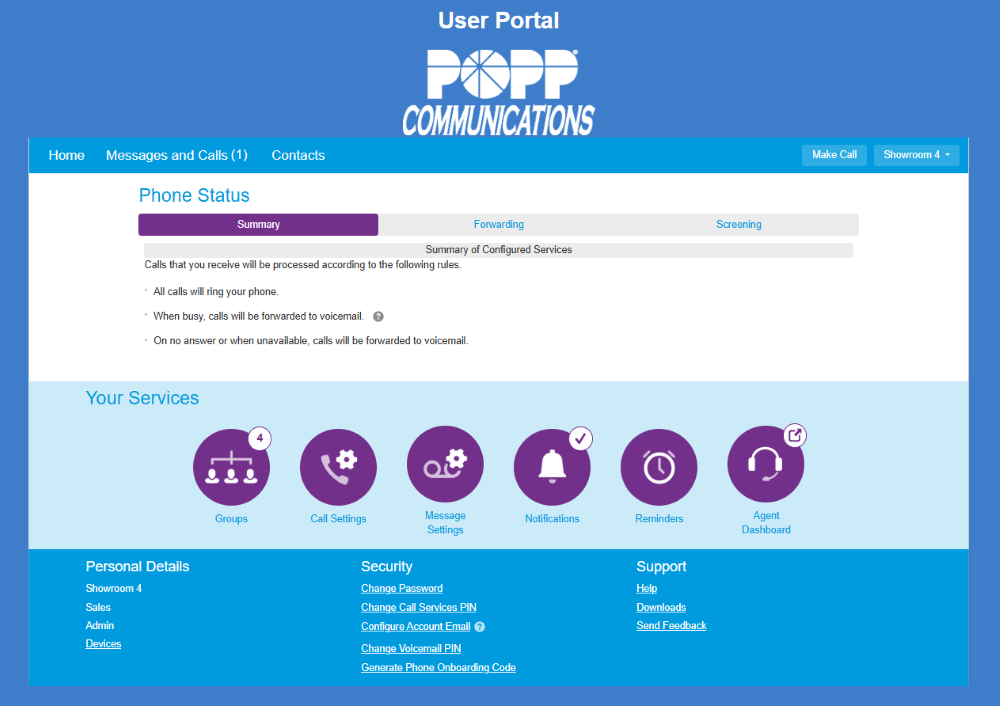
The User Portal for POPPs Hosted VoIP Phone System

What You Can Do in the User Portal

Home / Phone Status

  • Set up call forwarding (Immediate, Busy/No Answer, Unavailable)
  • Enable call screening (Do Not Disturb, Selective Rejection, Anonymous Rejection, Priority Call)

Messages & Calls

  • Listen to voicemails
  • Review call history (missed, dialed, received)

Contacts

  • View and set contacts
  • View and set speed dials
  • View system extension directory
  • View system short codes

Personal Details

  • Configure IP desk phone programmable keys

Security

  • Change your account password
  • Set up account email
  • Change your voicemail PIN

Make Call

  • Place outbound calls from your business number using any phone. Enter the number you want to call and the number you want to be reached at—our system connects you and displays your business caller ID.

Groups

  • View hunt group membership
  • Log in/out of groups

Call Settings

  • Adjust caller ID settings

Message Settings

  • Record and change greetings
  • Manage message playback options
  • Set up voicemail to email

Notifications

  • Manage message waiting notifications (phone, email, outdial)

Reminders

  • Enable call reminders

Agent Dashboard (only with Hosted Call Center)

  • Log in/out of queues
  • Change agent state (Available, Break, DND, etc.)
  • View call queue information:
    • Predicted caller waiting time
    • # of callers waiting
    • # of logged-in members

Built for Flexibility

The User Portal allows your team to work from anywhere and customize their call experience within the system.

Access can be enabled or restricted by POPP or by your designated system administrator.

TIP: Many POPP clients use the portals to view settings, and rely on our team to make changes for them.

Support Is Always Available

Even with self-service tools, you’re never on your own:

  • See our User Portal Reference Manual (31 pgs.) here
  • You have FREE remote support for changes
  • You have expert POPP consulting for system design and changes

Access the User Portal

Login URL: portal.popp.com
(Email or phone number + password required)

Need help updating your settings?

We’re here to help – just give us a call.

Contact Support
POPP Communications black logo

763-797-7900
620 Mendelssohn Ave N
Golden Valley, MN 55427

Company

About POPP

  • Servicing Twin Cities Small Business People
  • Why We’re The Best In Many Ways
  • POPP Multitalented People & Proven Practices

Why Choose POPP?
Industries We Serve
Case Studies & Client Success Stories
Community Involvement
Technology Partners
Careers
Carrier to Carrier
Terms & Policies

© 2026 POPP Communications. All rights reserved.

POPP-Hosted CLOUD Phone Systems

POPP Implementation Process & Expertise
Work-From-Anywhere Phone Systems
Customized Incoming Call Experience
Free Lifetime Support + Self Service Options
Administrator Portal Features
User Portal Features
POPP-Programmed Desk Phones
Yealink IP Desk Phones & Accessories
Mobile Softphone Apps
Desktop Softphone Apps

Business Phone Service & Telephone Numbers

Business Telephone Number Hosting & Management
Internet Phone Service for POTS Line Replacement
Wireless Phone Service for Fire Alarms and Elevator Phones
SIP Trunks for On-Premise PBX
PRI/CAS for Legacy Phone Systems

Small Business IT Essentials

  • Microsoft 365
  • Cloud Backup & Storage
  • Help Desk Support

Decision center

What is VoIP? A Twin Cities Business Guide to Voice Over IP (2026)

What is a Cloud Hosted VoIP Phone System? (And is it Right For Your Twin Cities Business?)

Can POPP’s Cloud Phone System Pay For Itself? (Spoiler: Yes, and Here’s The Math.)

Emergency Readiness for Modern Businesses: Why Your Phone System Matters More Than Ever

The Hidden Cost of Self-Service Phone Systems

What Happens If Your Business Internet Goes Down? Automatic Failover for Twin Cities Businesses Explained

5 Call Recording Benefits: Is It Worth It For Your Business?

POTS Lines Are Going Away: What Twin Cities Businesses Need to Know

Comparison: POPP vs. Comcast VoiceEdge

Comparison: POPP vs. Microsoft Teams Phone