
Work From Anywhere—Without Giving Up Your Business Phone
For Windows and Mac
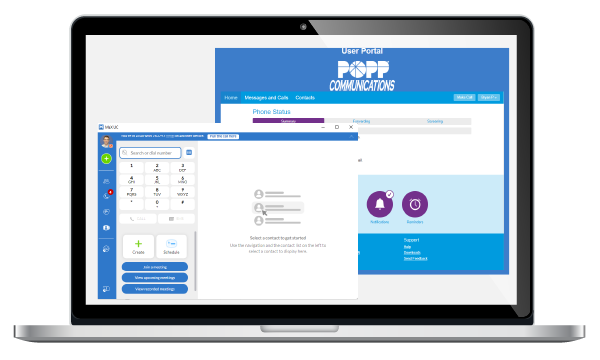
Your office phone is no longer tied to a desk.
Our desktop softphone app transforms any Windows PC or Mac into a fully functional business phone —complete with calling, voicemail, chat, and SMS using your business phone number.
Whether your team is in the office, working from home, or on the go, they can stay connected, responsive, and professional from anywhere with a reliable internet connection.
➡️Prefer to use your smartphone for calls? Click here to see POPP’s softphone app for mobile devices.
A Complete Desk Phone – Right on Your Computer
The desktop softphone app isn’t a “lite” version of your desk phone —it is your desk phone. For some users, the desktop app can fully replace their traditional IP desk phone. For others, it complements their IP desk phone
With a familiar, intuitive interface, your team can quickly:
- Make and receive business calls on business phone numbers
- Send and receive SMS/text messages on business phone numbers
- Access and manage voicemail
- Chat with coworkers in real time
- Control call features with simple point-and-click actions
For your business, this means:
- Less hardware to lease or purchase
- Greater flexibility for hybrid or remote teams
- Faster onboarding for new employees
These are the reasons softphone adoption continues to grow—recent industry estimates suggest 60–70% of SMBs now use softphone apps in some capacity, especially in hybrid work environments.
A Quick Note on Emergency Readiness

While softphones offer incredible flexibility, relying only on computer-based calling may not be ideal in every situation.
For example:
- Computers may be powered off, locked, or low on battery when an emergency occurs
- A 911 call from a desktop app may not automatically transmit your correct physical location
For these reasons, POPP recommends maintaining at least some physical phones or backup calling options as part of a broader business continuity plan in your facility.
Simple to Use. Easy to Support.
The desktop app is designed to feel familiar from day one:
- Clean, user-friendly interface
- Quick-access, quick-touch controls for common features
- Minimal training required
If you can use a computer, you can use this app. No steep learning curve. No risk of “breaking” anything.
And unlike many providers that push self-service, we’re here to help —at no charge—so everything works exactly the way it should.
Quick Start & Best Practices
Getting started is simple:
- Download and install the app on your Windows or Mac computer
- Log in with your POPP phone number and password and start calling
For best performance:
- Ensure a stable internet connection for the best call quality.
- Restart your computer at least once per week to maintain optimal memory and call quality.
Desktop App Overview Video (3 mins.)
Desktop App Quick Start Guide
Demo Videos of User Features (15 mins.)
Installation (3:33)
Introduction (1:26)
Part 1 – Presence (0:54)
Part 2 – Contacts (0:32)
Part 3 – Make and Receive Calls (4:24)
Part 4 – Chat and SMS Messaging (1:15)
Part 5 – Meetings (0:36) Unsupported feature
Part 6 – Voicemail and Messages (0:37)
Part 7 – Account Settings (1:40)
Important: 911 Calling Guidance
If you place a 911 call using the desktop app, emergency services may not automatically know your location.
Best practice:
Use a mobile phone or landline for emergency calls whenever possible, and be prepared to provide your location if calling from the app.
Unleash Work From Anywhere
See how easy it is to turn your computer into your business phone.