
Work From Anywhere—Using Business Phone Numbers
For iOS and Android devices
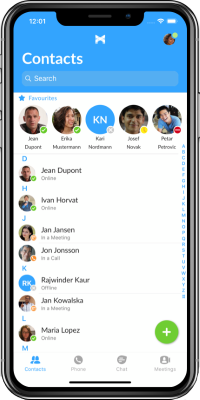
Your team is already using their smartphones all day. POPP’s employee smartphone app turns those devices into fully functional business phones—so they can work faster, respond quicker, and stay connected no matter where they are.
Call, text, chat, and check voicemail using your business phone number, not personal numbers—whether you’re in the office, at home, or on the go – anywhere you have a good internet connection.
➡️Prefer to use your desktop PC/Mac for calls? Click here to see POPP’s desktop app.
Save Time Every Day (And Let the System Pay for Itself)
Small inefficiencies add up fast—missed calls, delayed responses, checking multiple apps, or tracking down voicemails.
With everything in one place, your team can:
- Answer calls from anywhere without call forwarding
- Make calls from anywhere using the business phone number
- Respond to customers faster
- Access voicemail instantly
- Manage conversations in one simple app
The result? Less wasted time, faster response times, more productive employees, improved business reputation and increased revenue.

Stay Connected—Even When Your Office Power or Internet Goes Down

What happens if your business internet fails? Or the power goes out?
Your business doesn’t stop—and neither should your phones.
Because the app runs on mobile data or any available internet connection, your team can continue to:
- Make and receive calls on your business number
- Respond to customers without interruption
- Keep operations moving during outages or emergencies
For many businesses, this app is a key part of their business continuity plan.
Simple, Familiar, and Easy to Use
The app is designed to feel like the smartphone your team already knows how to use:
- Clean, intuitive interface
- Tap-to-call, text, or check voicemail
- Minimal training required
- Easy for any employee to pick up and start using
If you can use a smartphone, you can use this app.
Built-In Communication Tools
Everything your team needs, all in one place:
- Business calling (inbound & outbound)
- Business SMS/text messaging
- Internal team chat
- Visual voicemail
- Contact management
No switching between apps. No missed messages.
Mobile App Overview Video (2 mins.)
Mobile App Quick Start Guide
Demo Videos of User Features (20 mins.)
Installation (3:33)
Introduction (1:24)
Part 1 – Contacts (0:47)
Part 2 – Make and Receive Calls (3:09)
Part 3 – Call History and Voicemail (0:36)
Part 4 – Chat and SMS Messaging (1:12)
Part 5 – Meetings (0:39) Unsupported feature
Part 6 – Account Settings (1:12)
Part 7 – Using Native Cell Phone Dialer for Business Calls (5:12)
A Few Best Practices to Know
Emergency Calling (911):
For emergency calls, it’s best to use a land line or native cellular call (your regular phone dialer). If using the app, be prepared to provide your location to emergency services.
Voice Quality Tips:
Like all smartphone apps, performance depends on device health. Restarting your phone weekly clears device memory and helps maintain optimal call quality.
VoIP call quality on all softphone apps is dependent on your internet connection. If you don’t have a strong Wifi or cellular signal, your call quality will be affected.
Make Every Smartphone a Business Phone
We’ll show you how this app saves time, improves responsiveness, and keeps your business running.