

Most small businesses assume that slow internet means one thing: you need to add bandwidth.
But in reality, that’s often not the problem. For many businesses in the Minneapolis–St. Paul area, the issue isn’t the size of the connection—it’s what’s flowing through it, and how it’s being managed.
Understanding how your bandwidth is actually used can help you:
- Keep critical systems running smoothly
- Avoid overspending on internet service
- Improve performance across your network
What is Bandwidth (And Why It Matters for Your Business)?
Bandwidth is the amount of data your internet connection can carry at one time.
Think of it like a pipe:
- A larger pipe can carry more water
- A smaller pipe can carry less
But here’s the part many businesses miss:
It’s not just about the size of the pipe—it’s about what’s flowing through it at the same time.
If too much demand hits the pipe at once, or if the wrong things are taking priority, everything slows down.
What’s Flowing Through Your Internet Pipe?
Not all traffic uses your bandwidth the same way. Here’s how common business activities compare:
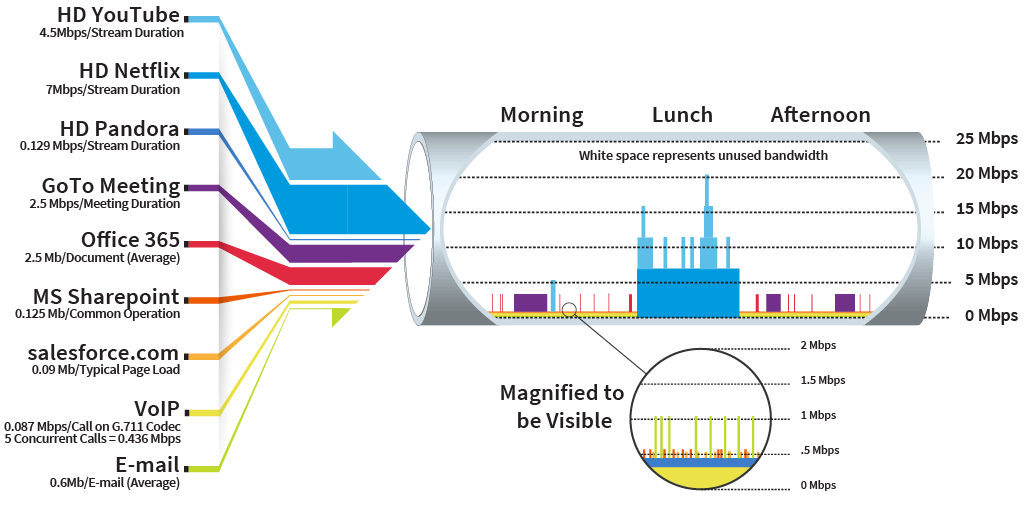
The takeaway:
Common office tasks consume far less bandwidth than you might think, so don’t be fooled by your ISP’s recommendation that you increase both your bandwidth and your internet bill!
How Much Bandwidth Do You Actually Need?
There’s no universal answer, but here’s what we see with most small businesses:
Everyday tasks like:
- Cloud software
- Basic web use
…barely make a dent in your internet pipe.
The real strain comes from:
- Multiple video meetings happening at once
- Large file transfers
- Streaming content across your team
That’s when your pipe starts to feel “too small”—even if it technically isn’t.
Why a Bigger Pipe Doesn’t Always Fix the Problem
When performance drops, the default solution from your internet provider is usually: “Upgrade to a bigger pipe.”
But that doesn’t address the real issue.
A bigger pipe won’t fix:
- Uncontrolled streaming traffic
- Large downloads happening at the wrong times
- Critical applications competing for bandwidth
- Lack of prioritization for voice or business systems
In fact, many Twin Cities businesses are paying for a larger pipe than they need—and still experiencing slowdowns.
The Real Solution: Controlling the Flow
Instead of just increasing the size of your pipe, the smarter approach is to control what flows through it—and when.
This includes:
- Prioritizing critical traffic (like VoIP phone system calls)
- Limiting or managing non-essential usage (like streaming)
- Scheduling large uploads or backups for off-peak times
- Using business-grade networking equipment to direct traffic
This is often called traffic prioritization (aka Quality of Service – QoS)—and it ensures your most important applications always have room to flow.
Are You Paying For More Internet Than Your Business Needs?
If you’re dealing with any of the following, your internet pipe may not be the real problem:
- Internet feels slow despite high bandwidth
- Call quality issues or dropped VoIP calls
- Video meetings freezing or lagging
- High monthly internet costs without clear improvement
These are signs that your pipe may be mismanaged—not undersized.
How To Right-Size Your Business Internet
For small and mid-sized businesses in Minneapolis–St. Paul, success isn’t about having the biggest pipe—it’s about having the right-sized pipe with the right flow control.
That starts with:
- Understanding what’s actually using your bandwidth
- Identifying where congestion is happening
- Aligning your internet service with real-world usage
- Saving money every month!
Get a Clear Picture of What’s Flowing Through Your Internet Pipe
We help businesses make good decisions about internet bandwidth so that systems perform properly without overpaying for bandwidth that will never be used.
 Why Slow Internet Will Never Completely Go Away (Even With More Bandwidth)