
• Skip to main content
  • Skip to header right navigation
  • Skip to site footer
  • Manage My Account
  • 763-797-7900
POPP Communications black logo

POPP Communications

  • Services
    • POPP-Hosted Cloud Phone Systems
    • Business Phone Service & Telephone Numbers
      • Business Phone Number Hosting & Management
      • Internet Phone Service for POTS Line Replacement
      • Wireless Phone Service for Elevator & Fire Alarms
      • SIP Trunks for On-Premise PBX
      • PRI/CAS Service for Legacy Phone Systems
    • Small Business IT Essentials
  • Industries
    • Professional Services
    • Warehouse and Distribution
    • Education and Nonprofits
    • Retail Establishment
    • Foodservice and Hospitality
    • Commercial Property Management
  • Company
    • About POPP
    • Why Choose POPP?
    • Community Involvement
    • Technology Partners
    • Careers
    • Decision Center
  • Help Center
  • Contact Us

Allow Pop-Ups

Instructions to Allow Pop-ups in your Browser

Some functions in Manage My Account (MMA) require pop-ups to be enabled in order to function.  Click on your browser below to view instructions on how to enable pop-ups for MMA.

Steps may vary based on your operating system & internet browser version.

Chrome browser logo
Google Chrome

Click the “Pop-up Blocked” icon and then select “Always allow pop-ups and redirects from https://mma.popp.com”
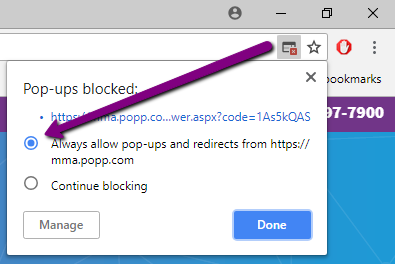
Arrow pointing to Always allow pop-ups in Safari
Safari browser logo
Apple Safari

To enable pop-ups, open the “Safari” menu, then select “Preferences…”
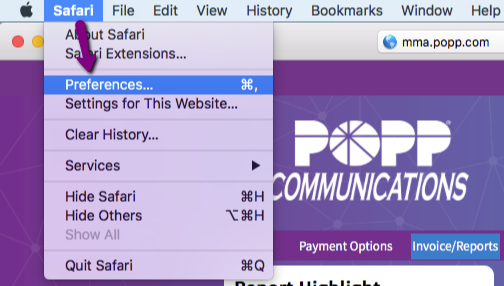
Arrow pointing to preferences in Safari window

Select “Pop-up Windows” from the General list. To the right of mma.popp.com, change the dropdown option to “Allow”.
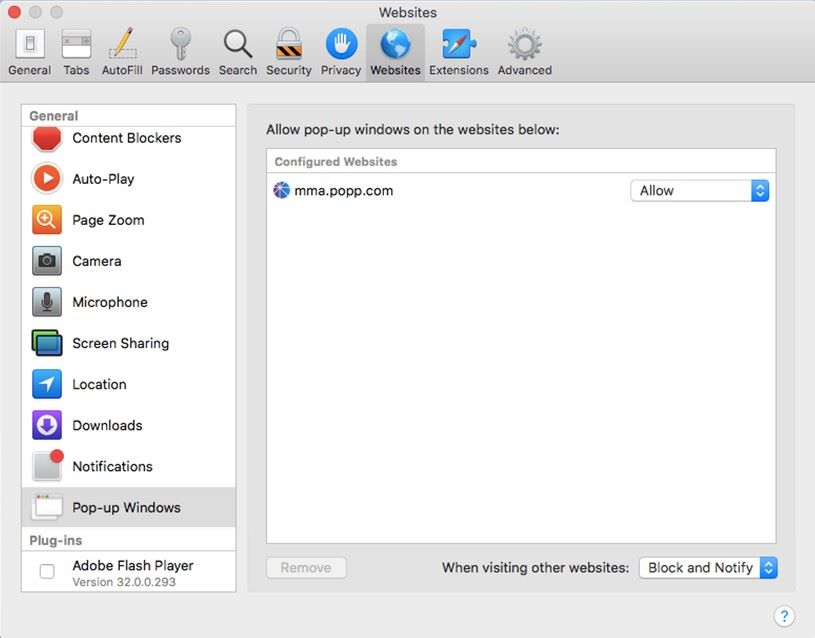
Pop-up windows selected in Safari

Close the Preferences window when finished.

Firefox browser logo
Mozilla Firefox

Click the “Options” button on the “Firefox prevented this site from opening a pop-up window.” message

Chose “Allow pop-ups from mma.popp.com”
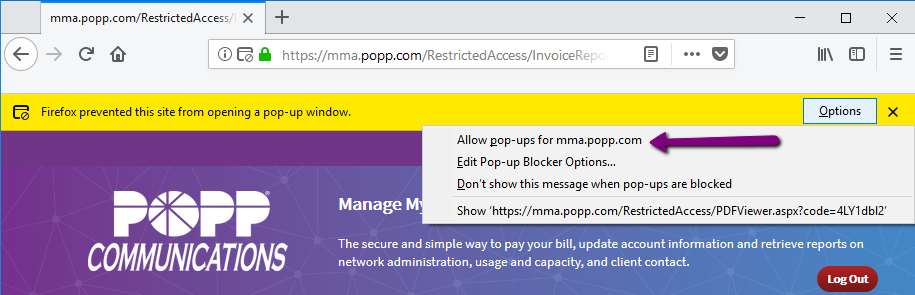
Arrow pointing to allow pop-ups for Firefox options
Edge browser logo
Microsoft Edge

Click “Always allow” from the “Microsoft Edge blocked a pop-up from mma.popp.com” message at the bottom of the screen.
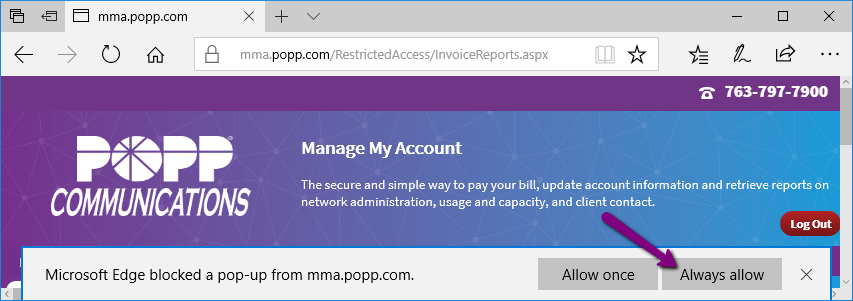
Arrow point to always allow for pop-ups
Internet explorer browser logo

Microsoft Internet Explorer has reached end-of-life and is no longer supported as a browser for POPP MMA.

POPP Communications black logo

763-797-7900
620 Mendelssohn Ave N
Golden Valley, MN 55427

Company

About POPP

  • Servicing Twin Cities Small Business People
  • Why We’re The Best In Many Ways
  • POPP Multitalented People & Proven Practices

Why Choose POPP?
Community Involvement
Technology Partners
Careers
Carrier to Carrier
Terms & Policies

© 2026 POPP Communications. All rights reserved.

POPP-Hosted CLOUD Phone Systems

POPP Implementation Process & Expertise
Work-From-Anywhere Phone Systems
Customized Incoming Call Experience
Free Lifetime Support + Self Service Options
Administrator Portal Features
User Portal Features
POPP-Programmed Desk Phones
Yealink IP Desk Phones & Accessories
Mobile Softphone Apps
Desktop Softphone Apps

Business Phone Service & Telephone Numbers

Business Telephone Number Hosting & Management
Internet Phone Service for POTS Line Replacement
Wireless Phone Service for Fire Alarms and Elevator Phones
SIP Trunks for On-Premise PBX
PRI/CAS for Legacy Phone Systems

Small Business IT Essentials

  • Microsoft 365
  • Cloud Backup & Storage
  • Help Desk Support

Decision center

What is VoIP? A Twin Cities Business Guide to Voice Over IP (2026)

What is a Cloud Hosted VoIP Phone System? (And is it Right For Your Twin Cities Business?)

Can POPP’s Cloud Phone System Pay For Itself? (Spoiler: Yes, and Here’s The Math.)

Emergency Readiness for Modern Businesses: Why Your Phone System Matters More Than Ever

What Happens If Your Business Internet Goes Down? Automatic Failover for Twin Cities Businesses Explained

5 Call Recording Benefits: Is It Worth It For Your Business?

POTS Lines Are Going Away: What Twin Cities Businesses Need to Know

Comparison: POPP vs. Comcast VoiceEdge

Comparison: POPP vs. Microsoft Teams Phone